How to Fix Audio Delay on Bluetooth Headphones on PC (7 Steps)
Note: If you buy through links on our site, we may earn an affiliate commission at no extra cost to you. How this works.
- Pick the stereo headphones output, not the headset one
- Move closer and away from USB 3.0 devices
- Remove the headphones, then pair them again
- Turn off audio enhancements for the headphones
- Update the Bluetooth and audio drivers
Why do Bluetooth headphones lag behind on a PC?
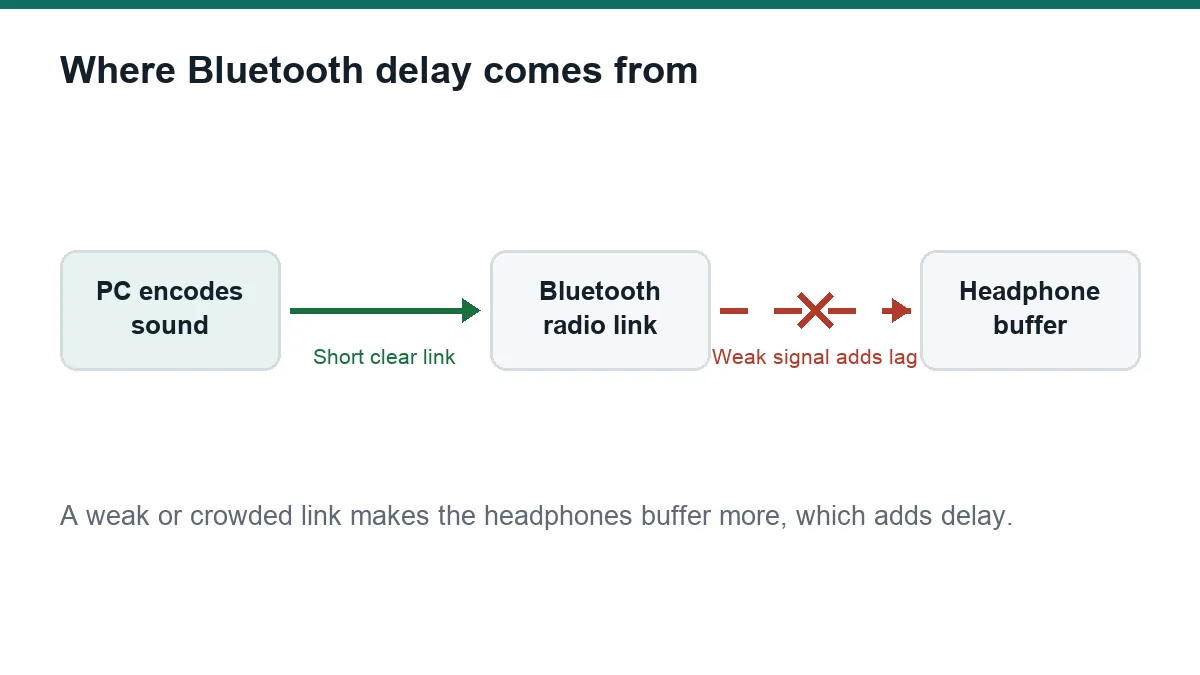
Every Bluetooth audio link has some delay. The PC compresses the sound, sends it in small packets, and the headphones store a little before playing it. That buffer stops dropouts, but it also adds lag.
The delay grows when something makes that link work harder:
- A basic codec: the default codec most headphones fall back to is not built for low delay. Our Bluetooth codecs explained guide covers the differences.
- Weak signal: distance, walls and other radios force resends, so the headphones buffer more.
- USB 3.0 noise: Microsoft notes that unshielded devices in USB 3.0 ports can interfere with Bluetooth.
- Old drivers: an outdated Bluetooth or audio driver can handle the stream badly.
- Headset mode: when an app opens the microphone, many headphones switch to a call profile with poorer sound.
Is some delay normal?
Yes. A small delay is part of how Bluetooth audio works, and most people do not notice it with music. It becomes obvious with video, games and anything where you see the sound happen.
Key takeaway: you can shrink the delay, but you cannot remove it fully over standard Bluetooth. For competitive gaming, a wired headset or a maker’s own low delay dongle is the reliable answer.
Wired sound also avoids compression, as our guide on why Bluetooth sounds worse than wired explains.
What you need
- Charged headphones: a low battery can make the link less stable.
- Admin access to the PC: needed to update or reinstall drivers.
- The headphone maker’s app or manual: some models offer a low delay or gaming mode there.
- A USB extension cable (optional): moves a Bluetooth dongle away from crowded ports.
Warranty note: install drivers only from Windows Update or the PC or adapter maker. Driver tools from unknown sites can break audio and are not supported by the maker.
How do you fix Bluetooth audio delay on Windows?
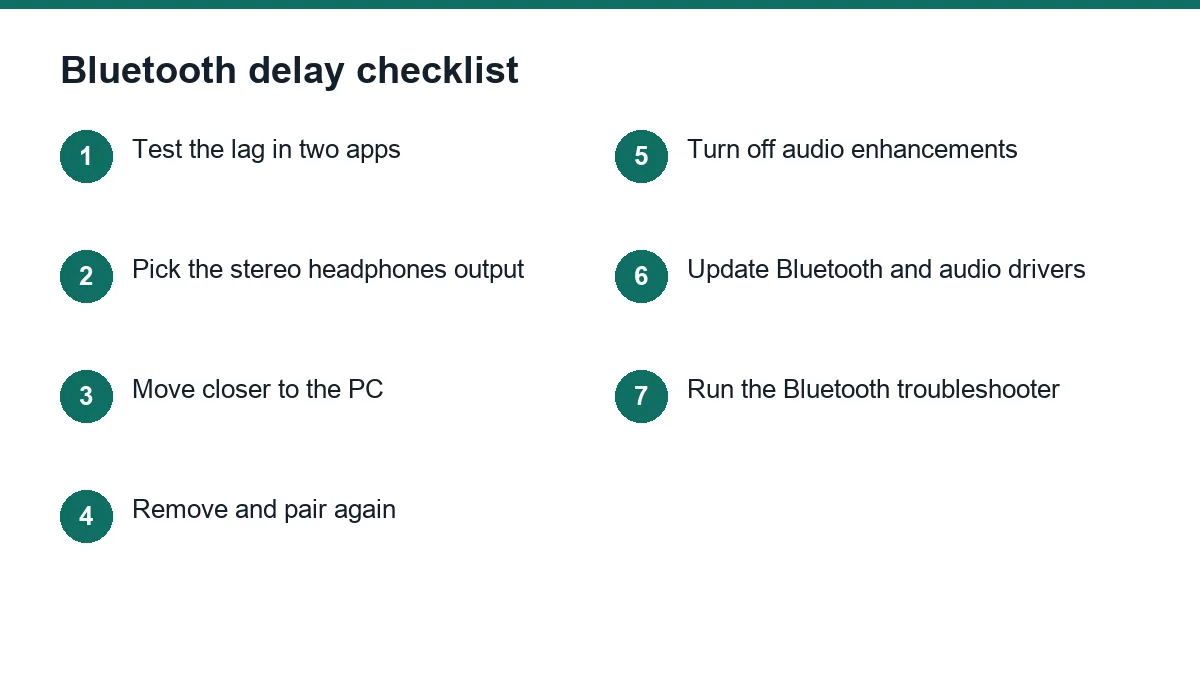
Step 1: Check if the lag is in one app
Play a video in two different apps, such as a browser and a media player. If only one lags, update or restart that app first.
Step 2: Choose the right output
Select the Speakers icon on the taskbar, then the arrow next to the volume slider. Microsoft calls this Select a sound output. Pick the stereo headphones entry, not one labeled as a headset or hands-free.
Step 3: Move closer and clear the path
Sit within a few feet of the PC with nothing solid between you. Move USB 3.0 drives and hubs away from the Bluetooth adapter.
Step 4: Remove and pair again
Open Start > Settings > Bluetooth & devices > Devices. Select More options next to the headphones, then Remove device > Yes. Put the headphones in pairing mode and add them again.
Step 5: Turn off audio enhancements
Open Sound settings and select the headphones in the Output section. Under Advanced settings, set Audio enhancements to Off.
Step 6: Update the drivers
Search for Device Manager, expand Bluetooth, right-click your adapter and select Update driver. Do the same under the audio section, then restart the PC.
Step 7: Run the Bluetooth troubleshooter
Open Start > Settings > System > Troubleshoot > Other troubleshooters. Next to Bluetooth, select Run and follow the prompts.
Still not working? What to check next
- The PC’s Bluetooth adapter: older built-in adapters can lag. A newer adapter from the PC maker may help.
- The headphone firmware: check the maker’s app for updates and a low delay setting.
- Wi-Fi on the same band: busy 2.4 GHz Wi-Fi can crowd Bluetooth. Our guide on whether Bluetooth interferes with Wi-Fi explains the overlap.
- A video player offset: many media players let you shift audio timing to match the picture.
If the headphones lag on every device, contact their maker, since the fault may be in the headphones. More fixes sit in the Bluetooth help hub.
Common mistakes to avoid
- Using the headset output for music: it is meant for calls. Pick the stereo entry for video and games.
- Leaving the mic on in a chat app: an open microphone can keep the headphones in call mode.
- Pairing to many devices at once: a phone nearby may grab the link. Turn its Bluetooth off while testing.
- Plugging the dongle next to a USB 3.0 drive: move it to another port or use an extension.
- Downloading driver packs from unknown sites: use Windows Update or the PC maker’s support page instead.
- Expecting zero delay: standard Bluetooth always adds some lag. For fast games, a wired headset is the honest fix.
Products for this job
Related products on Amazon. We have not tested these ourselves; check the specs and the reviews on Amazon before you buy.
 TP-Link USB Bluetooth Adapter for PCCheck price on Amazon
 Avantree Orbit Pro Bluetooth TV TransmitterCheck price on Amazon
 Soundcore by Anker Liberty 4 NC Wireless EarbudsCheck price on Amazon
Frequently Asked Questions
Why is the delay worse in games than in videos?
Many video apps quietly shift the picture to match the sound, so the delay is hidden. Games cannot wait for audio, so you hear the lag between an action and its sound much more clearly.
Do Bluetooth dongles reduce audio delay?
A newer Bluetooth adapter can help if the PC's built-in one is old or poorly placed. Some headphone makers also sell their own wireless dongles built for low delay, which usually beat standard Bluetooth for gaming.
Why does sound get worse when I join a call?
When an app opens the microphone, many headphones switch to a hands-free profile that carries voice in both directions. That profile has lower sound quality, so music and game audio sound flat until the call ends.
Can a Windows update cause Bluetooth audio lag?
Yes, a new driver from an update can sometimes change how the Bluetooth adapter behaves. If lag began after an update, roll back the driver in Device Manager or install the PC maker's latest version.